Tidak perlu panjang lebar, anda mencari kode source code logika untuk membuat sebuah deret bilangan prima dengan delphi 6 atau delphi 7? ini langsung aja source kodenya. maaf belum sempat membuat previenya. Semoga cukup membantu.
procedure TForm1.Button1Click(Sender: TObject);
var I,X,Y,J,W:integer;
begin
ListBox1.Items.Clear;
J:=strtoint(edit1.Text);
for I:=1 to J do
begin
X:=0;
FOR W:=1 TO I do
BEGIN
Y:=I Mod W;
if Y=0 then X:=X+1
END;
if X=2 then
ListBox1.Items.Add(inttostr(I));
end;
end;

Showing posts with label delphi 7 tutorials. Show all posts
Showing posts with label delphi 7 tutorials. Show all posts
Thursday, October 24, 2013

Friday, May 6, 2011
Tutorial bagaimana cara membuat jam digital dengan komponen timer delphi
Membuat jam digital dengan delphi sangat mudah dan simple. Anda tidak perlu pusing-pusing untuk memikirkan kode yang rumit dan menyulitkan. Cukup ikuti tutorial yang saya buat dengan cukup sesat ini.
Membuat program jam dengan delhi 7:
Beberapa Hal yang perlu anda Persiapankan:

1. Letakkan Komponen timer yang bergambar jam (posisi di menu komponen menu system) ke dalam form anda
2. Masukan Label atau sejenisnya ke dalam Form, kemudian pada property kosongkan caption
3. Doble klik pada komponen timer atau klik timer dan masuk ke tab event, bagian OnTimer lalu masukan kode sesat sebagai berikut:
procedure TForm1.Timer1Timer(Sender: TObject);
begin
label1.caption:=timetostr(time);
end;
fungsi dari script (label1.caption:=timetostr(time);) adalah untuk mengkonversikan nilai pada komponen Timer
yang bersal dari komputer anda ke dalam tipe data dalam bentuk string.
Setelah itu jalankan program dengan perintah run (F9), dan berikut previewnya:
 Semoga bermanfaat dan sukses selalu.
Membuat program jam dengan delhi 7:
Beberapa Hal yang perlu anda Persiapankan:

1. Letakkan Komponen timer yang bergambar jam (posisi di menu komponen menu system) ke dalam form anda
2. Masukan Label atau sejenisnya ke dalam Form, kemudian pada property kosongkan caption
3. Doble klik pada komponen timer atau klik timer dan masuk ke tab event, bagian OnTimer lalu masukan kode sesat sebagai berikut:
procedure TForm1.Timer1Timer(Sender: TObject);
begin
label1.caption:=timetostr(time);
end;
fungsi dari script (label1.caption:=timetostr(time);) adalah untuk mengkonversikan nilai pada komponen Timer
yang bersal dari komputer anda ke dalam tipe data dalam bentuk string.
Setelah itu jalankan program dengan perintah run (F9), dan berikut previewnya:
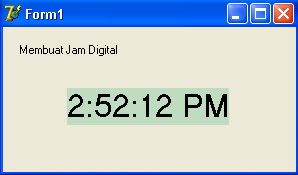 Semoga bermanfaat dan sukses selalu.
Friday, April 29, 2011
How to make a simple web browser with delphi 7
This tutorial is very simple and easy to use. you can make our own web browser by using delphi software.
first run the delphi software from the windows start menu. and then step by step:
step 1. create a new application. File>New>Applicationfirst run the delphi software from the windows start menu. and then step by step:
Now you have a default form that name Form1.
step 2. place one TEdit and TButton. dont forget to place TWebBrowser too. Position at Form1
like this:
 step 3. this is the last step to finish our web browser
Double click at Button1 and type the script like this (bold text is the main script) :
procedure TForm1.Button1Click(Sender: TObject);
begin
webbrowser1.Navigate(edit1.Text);
end;
end.
Run our program from green play button or press F9 for fast run.
the program are running, try to write some word to the box.
Example: explore-id.blogspot.com or other site.the program are running, try to write some word to the box.
after finish the typing press the Button1. then the website will be appear.
Wow that very simple..
Tips: for fast browsing usually after typing we use enter button.
This is the simple tips for you
on the Edit1 Events chose OnKeyPress by double click at the right combo box.
script like this:
procedure TForm1.Edit1KeyPress(Sender: TObject; var Key: Char);
begin
if not (Key=chr(13)) then exit;
Button1Click(Sender);
end;
end;
test again by running the program typing and enter.. make sure connect the internet to test browsing.
Well done.. You have made your own web browser now. very fast and simple.
by ramadhani
Subscribe to:
Posts (Atom)